

Transforming Manual Scans into Professional Data Pipelines
This project showcases a fundamental skill in cybersecurity and automation: replacing slow, manual security checks with a reliable, structured Python solution. This script utilizes the python-nmap library to execute a targeted network audit, isolate vital security intelligence, and generate a clean, timestamped report.
The core challenge was to manage the high risk of network interaction while translating Nmap’s complex, raw output into a simple format suitable for analysis.
The Technical Pipeline
The entire audit process is broken into three robust stages, demonstrating strong command of data structures, error handling, and file processing.
This code is intended for educational purposes only. Please do not use this code for illegal or unauthorized activities!
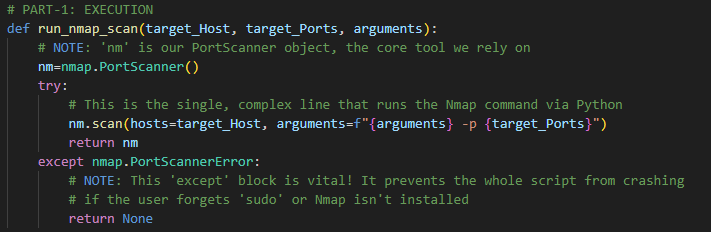
Part 1: Execution and Robustness (run_nmap_scan)
The first step is a high-risk operation. The run_nmap_scan function is designed for resilience:
- Stealth & Scope: It uses an f-string to dynamically build the Nmap command, including the crucial
-sV(Service Version detection) flag. - Error Handling: The
try...except nmap.PortScannerErrorblock is essential. It prevents the entire script from crashing if Nmap is not installed or if the user forgets to run the script with elevated permissions (sudo). This demonstrates writing production-ready code that anticipates failure.
Part 2: Data Transformation (extract_open_port_data)
This is the central intelligence phase, where the script acts as a data translator, turning raw Nmap output into clean facts.
- Nested Iteration: The function uses three nested loops to systematically navigate the complex, multi-layered dictionary structure of the Nmap results.
- Security Filter: The
if port_detail['state'] == 'open':statement filters out all closed or filtered ports, isolating only the data relevant to the security audit. - Data Enrichment: We capture five crucial metrics, including the Service and Version number (
port_detail.get('version', 'N/A')). This is the most valuable data, as it allows for immediate checking against vulnerability databases.

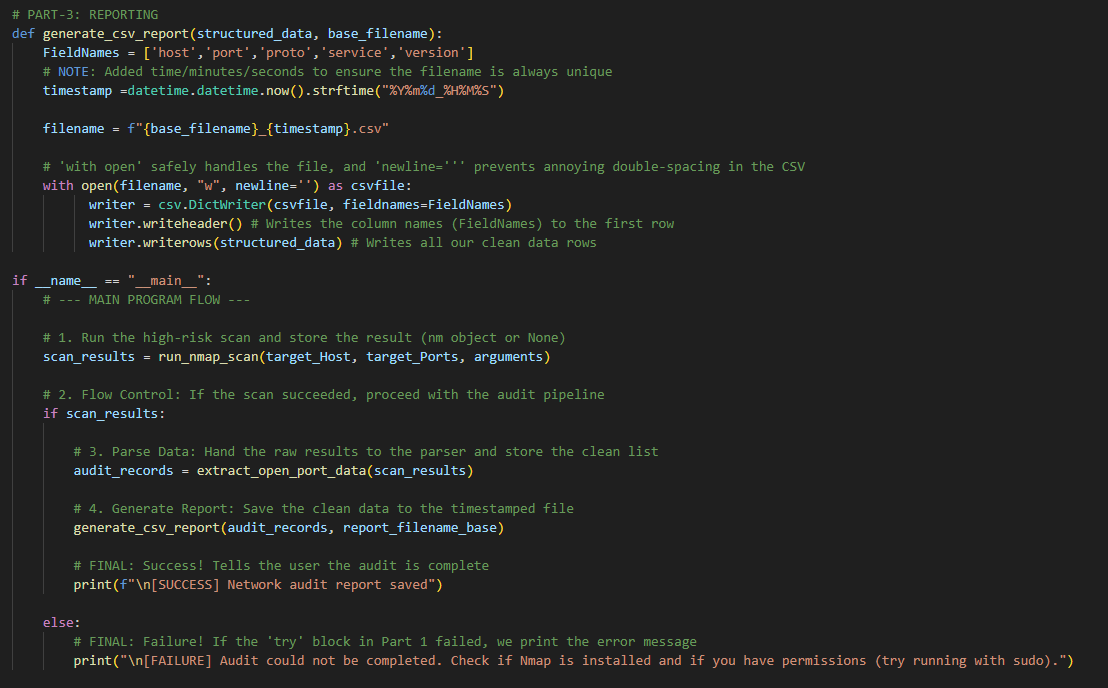
Part 3: Reporting and Persistence (generate_csv_report)
The final stage ensures the data is saved in a professional, reusable format.
- Structured Output: The
csv.DictWriteris used to guarantee that the final CSV file aligns perfectly with the dictionary keys (host,port,service, etc.), creating a clean, column-labeled report. - File Safety: The
with open(...)statement includesnewline=''and a timestamp, ensuring the file is closed safely and never overwrites previous audit reports.
Final Code Implementation
This script is fully functional and demonstrates the complete flow from network interaction to automated file generation.
Python
import nmap
import csv
import datetime
# (Note: Imports like os, platform, subprocess, etc., are omitted here as they are not used in the final version of these three functions)


# --- PROJECT CONFIGURATION (Setup) ---
target_Host = "127.0.0.1"
target_Ports = "22-443"
arguments = "-sV -sS"
report_filename_base = "network_audit"

# PART-1: EXECUTION (The Scan Engine)
def run_nmap_scan(target_Host, target_Ports, arguments):
    # Initializes the scanner object
    nm=nmap.PortScanner()
    try:
        # Runs the core Nmap command
        nm.scan(hosts=target_Host, arguments=f"{arguments} -p {target_Ports}")
        return nm
    except nmap.PortScannerError:
        # Graceful failure handling
        return None

# PART-2: DATA PARSING (The Translator)
def extract_open_port_data(nm_results):
    clean_data=[]
    # Loop 1: Hosts, Loop 2: Protocols, Loop 3: Ports
    for host in nm_results.all_hosts():
        for proto in nm_results[host].all_protocols():
            for port in nm_results[host][proto].keys():

                port_detail = nm_results[host][proto][port]

                # Filter for open ports and extract data
                if port_detail['state'] == 'open':
                    record = {
                        'host': host,
                        'proto': proto,
                        'port': port,
                        'service': port_detail.get('name', 'N/A'),
                        'version': port_detail.get('version', 'N/A')
                    }
                    clean_data.append(record)

    return clean_data

# PART-3: REPORTING (The CSV Generator)
def generate_csv_report(structured_data, base_filename):
    FieldNames = ['host','port','proto','service','version']
    timestamp =datetime.datetime.now().strftime("%Y%m%d_%H%M%S")

    filename = f"{base_filename}_{timestamp}.csv"

    # Safely opens the file for writing
    with open(filename, "w", newline='') as csvfile:
          writer = csv.DictWriter(csvfile, fieldnames=FieldNames)
          writer.writeheader()
          writer.writerows(structured_data)

# --- MAIN EXECUTION ---
if __name__ == "__main__":
    scan_results = run_nmap_scan(target_Host, target_Ports, arguments)

    if scan_results:
        audit_records = extract_open_port_data(scan_results)
        generate_csv_report(audit_records, report_filename_base)

        print(f"\n[SUCCESS] Network audit report saved")

    else:
        print("\n[FAILURE] Audit could not be completed. Check if Nmap is installed and if you have permissions (try running with sudo).")




Leave a Reply